Dinamo deosn't work correctly
Hallo dear user-comunity,
I have two TM44-Modules connected and cofigurated per DIP as is discribed in the DINAMO Plug & Play handbook.
The TM44-Modules can nither be recognized in the DinamoConfig under primary adress 0.0 nor the secondary adress 0.1 There is also no orange LED in function on the TM44-Modules.
When I set both DIP 6-Switches to off-Position on both TM44_modules, than they will correctly be recognized in the DinamoConfig(s.a. the screenshot of the DinamoConfig). But if I open iTrain,the green LED on the RM-C switch on and all occupied contacts of the blocks from TM44 switch to active status (s.a.the file "Kleinstadtbahnanl_DINAMO.tcd).
In both cases mentioned above, no occupied-contact can be activated through a lok on it.
What goes wrong ? How can I solve this problem ?
For your help many thanks
With friendly greatings
Ulrich
PS: file of Blok- and belegtmelder
Because of their size I must send several answers with the files
here the next files
here hte last file
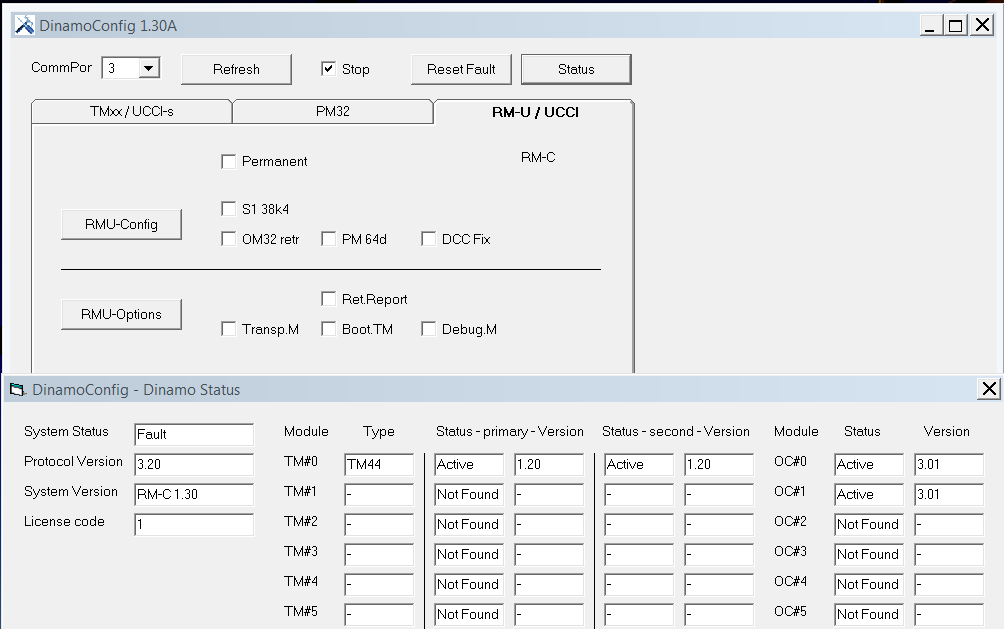
DinamoConfig_Status with DIP 6 in Off-Position.PNG
Hallo Ulrich,
wir haben schon per E-Mail kommuniziert. Mein Vorschlag zum testen: kannst du mal die zwei TM44 einzeln ausprobieren. Also alle DIP-Schalter auf ON und dann nur eine TM44 mit dem RM-C verbinden. Was siehst du dann in DinamoConfig. Wenn wir dann wissen dass die beide Modulen an sich gut funktionieren, dann machst du die Verbindung und probierst ob die beide funktionieren.
Grusse
Frans
Hallo Frans,
vielen Dank für die Rückmeldung.
TM44-Modul funktioniert auf primary adresse 0.0 auch das zugehörige OC32-Modul mit allen DIp-Switches auf ON.
Das zweite TM44-Modul alleine wird zwar erkannt, aber das angeschlossene OC32-Modul nicht. Ausserdem blinkt die orange LED in schneller Folge.
Wenn ich beide TM44-Module wie vorgeschrieben zusammenschalte mit den erforderlichen DIP-Switch-Stellungen, so wird das TM44-Modul und auch die zugehörige OC32 erkannt, aber nicht das zweite TM44-Modul und die zugehörige OC32.
Offenbar arbeitet das zweite TM44-Modul nicht richtig.
Ich werde stattdessen mal ein anderes TM44-Modul einsetzen und gebe dann Bescheid.
LG Ulrich
Ulrich,
Have you disabled the RS485 terminators on all modules except the last TM44?
So remove the terminator jumpers on the OC32's
Switches 7&8 on all TM44's OFF except the last TM44 on the bus 7&8 ON
Best regards,
Leon
Hallo Frans,
leider zeigt sich das gleiche Problem auch beim Austausch des zweiten TM44-Moduls.
Die angeschlossenen Blöcke an der zweiten TM44 haben in allen Fällen Null V Spannung.
Nun habe ich das Ersatzmodul TM44 an die erste Stelle gesetzt. Dort arbeitet es normal wie das ursprünglich erste Modul!
Also liegt es offenbar nicht an den Modulen selbst. Habe außerdem alle RJ45 LAN-Kabel nochmal ausgetauscht. Dies hat aber keine Änderung gebracht. Also an den Datenkabeln liegt es offenbar auch nicht.
Was kann die Ursache sein ?
LG Ulrich
Hallo Leon,
on the TM44-Modules itself there is only the Power-Jumper. There is no RS485 terminator jumper! The RS485 terminator jumper on the OC32 devices are removed. The DIP-Switch 6 on the first TM44-Module is on and off on the second and last TM44-Modul. The DIP-Switches 7 and 8 are set as discribed.
There is no other situation as discribed above.
LG Ulrich
Ulrich,
Ok, terminator settings should be ok then.
On the TM44 there is no jumper for terminator. That's done through switches 7&8. On the OC32 it's a jumper. Switch or jumper, technically is identical. It's a short or open circuit.
When you add TM44 or OC32 modules, do you reboot the RM-C, e.g. by pressing the reset switch?
Could you make a photo of your installation (wiring)?
Leon
Hallo Leon,
Sorry, I have found no hint, that the reset-switch must be resetet at the RM-C.
Ok now all Modules are built up in the DinamoConfig.
But the TM44-Modules have the status "fault" and not "active". Is this ok?
Further problem is, that the occupied-contacts from the blocks of the first TM44-Module works well, but not those from the blocks of the second TM44-Modules, althoug all adresses in iTrain are set in the right way.
But it's curious, that if I connect only the second TM44 with all DIP-Switches in ON-position, the occupied-contacts of the block from the first TM44 get on, if I set a lok on a block of the second TM44.
What goes wrong?
May it be, that this results from not updatet adresses when changing the place of the TM44-Modules as discribed above?
In addition you find a photo of the wired installation, but it's not sharp enough, because the attached-file-size is limitet.
LG Ulrich
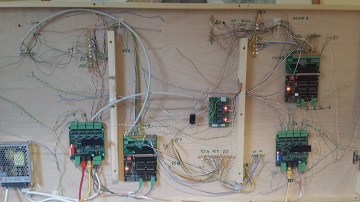
20170303_Kleinstadtbahnanl.jpg
Ulrich,
When the RM-C starts, it will start to scan the network to find what's out there. This will take about 15 seconds, depending on the size of your system. The more modules, the faster it will go. When the RM-C has discovered how the world looks today, it will start working with that environment.
If you add something to the network, the RM-C won't see that. It knows how the world looks and that's it. When you remove a module, the RM-C will keep trying to communicate with that module, however it will automatically lower the retry-frequency in order not to disturb the throughput to the other modules.
You can see it when getting the status with DinamoConfig:
- Not Found = There is no such module found when started
- Active = Module found and communicating
- Idle = The module was there when the network was scanned, but now it's gone.
- Fault = Communicating, but the module is in Fault state
Fault: When a module that controls traffic (TM-H, TM44, UCCI, RM-x) looses communication with it's "host" (so when a TM44 looses communication with an RM-C of when the RM-C looses communication with the PC) it will automatically stop all traffic it controls and issue "Fault". It's a safety measure. The "host" has to actively reset the fault to be sure that the cause for the fault has been solved. In DinamoConfig you can simply do that by pressing "Reset Fault". There can be other causes for a Fault state (internal buffer overflows, system hardware failure, etc), but usually "Fault" is nothing severe. It just means that the system is in a kind of safety halt state.
There are 2 ways to force the RM-C to rediscover the world:
- Reset the RM-C module
- Disconnect all modules or switch off everything except the RM-C itself.
In case 2 above, the RM-C will realise there's nothing left worth existing for anymore and will start discovering again.
Another thing: If you change the address of any module this address does not change until you reboot the module on which you have changed the address.
It is assumed that, when you change your configuration, add modules, etc, you do that while power is off. It's a matter of logical safety to do so. Yes, I know, I'm lazy too and I usually work on systems that are live, but then remind yourself that the logic is all based upon "change settings only when power is off", so you may have to reboot modules to get it all at work.
Once your system is up and running you won't be bothered by all of this. It will simply work.
Hope this clarifies some things (and if someone want to translate in German, that would be nice (:biggrin:))
Best regards,
Leon
Hallo Leon,
I'm just back from a meeting and I'm very pleasured to read your instruction to right handle the hardware components.
I'm not an electronic specialist and therefore such informations are very important.
I think it will be sufficient for the market in europe, when your existing papers in Netherland speach would be translate in english.
Thank you very much for your help and I hope, that I can now beginn to test my little "Kleinstadtbahnanlage" and optimize the parameters for a good manner of my Spur Z equipment!
LG Ulrich
Hallo Leon,
I'm a little desperate and it seems to me that it is a stony way to get success with the Dinanmo system!
I have follow all your advice above and in the DinamoConfig Status all modules are right and active.
Before I have corrigated all adresses in the iTrain and then connect to the RM-C and the other modules with reset.
But the occupied-contacts from the second TM44 with block-no 3, 5a, 6 and 7 cannot be activated.
I attache the file of my iTrain-configuration.
How can I reboot the modules, specially the second TM44 ?
Where can I download the handbook of the DinamoConfig (I hope I could get in english), Ican't found it here in DinamoUsers.
LG Ulrich
Dear Leo, dear Frans,
in addition to the steps of my former postings, I have try the following steps:
1) I change the TM44-Modul on the second position against my third module and make all the same procedures as disribed from Leon. But the result is the same: no occupied-contacts from the blocks of the TM44-modul can be acctivated
2) than I switch only the second TM44-modul to the RM-C and that all DIP-Switches of this single modul in ON-positon and make al necessary steps as above.
If I test the occupied-contacts in sequence from block 3, 5a, 6, 7 of this modul, than the occupied-contacts of the first TM44-modul with block 1, 2,5b and 4 response in this sequence.
What does this mean? Are the information of the first postioned TM44-modul stored in RM-C, although I have make all necessary steps, as dicsribed from Leon?
I hope you can solve my ongoing problem!
It seems, that no other users from germnay join to this forum.
Could you give me hints about modelbaarners who use Dinamosystems with iTrain for märklin spoor z in analog modus in germany, specially in the region of "nordrhein-westfalen" ? It would help me to change experience with them.
Thank you for your help.
Friendly greetings
Ulrich
Hello Ulrich,
With interest I did read your "struck-ling" with Dinamo and iTrain. By myself I'm also driving with Märklin Z, Dinamo and iTrain, so hopefully I can give you some hints.
The reason that the occupied-contacts reacting if it is the first TM-44 is because of the Dip-switch setting. The occupied-contacts of number 1 are exactly the same as number 2 except the change of the dip-switch. So 0.1 is identical to 1.1.
When you make your second TM-44 as he has to react as number 1 it is number 1.
What you can do is the change the dip-switches for your second TM-44 to number 2 in Dinamo settings :
Dip1 = On Dip2= Off Dip3=On Dip4=On Dip5=On and Dip6=Off
Than you need to fill in in iTrain the corresponding numbers of that TM-44
So the first Block is 8 for Dinamo and 2.1 for iTrain with occupier 1 = 2.0 etc.
After changing the TM-44 in Dinamo you have to change it also in iTrain. Every card number has its unique blocks and occupiers.
In iTrain you can set by the second tab "Wijzig on Dutch perhaps Change in English on German = Bearbeiten" at the last field "Voorkeuren= Voreinstellungen" that you want to split up your Blocks in Standard or 4 or 8 Blocks. If you change it you will see that iTrain gives corresponding numbers as to your TM-44 cards.
To be sure you can check in Dinamoconfig after changing dip-switches if the TM-44 is on the right position.
It looks that you work already with the omrekenen TM-44 xls sheet from Frans, so if you take the original you found the numbers for block and occupier.
I hope it helps you a bit.
Greetings,
Geert
Ulrich,
Changing the address to module number 2.0 may work, but it should not be necessary. I cannot follow exactly what you do and therefore cannot see what's wrong in your case.
Remind that detectors on module 0.1 are in the range 64..79, detectors on 1.0 are in 128..143, detectors on 1.1 are in 192..207 etc. So there are only 16 detectors per TM44, but they are in blocks of 64 ...
You may download and install JdinamoCC3. It's a program for cars, but it allows you to show the feedbacks, also from TM44's. It may help you to see what's going on.
Best regards,
Leon
Hallo Geert,
if I follow your advice for configuration the second TM44-Modul, than I have both TM44-Modules in primary-status as is seen in the attached file DinamoConfig_Status.
In the next post you'll find the corresponding omrekenen van blok naar bezetmelder TM44 for my blok-structure, which is yellow dottet.
In the Dinamo-Modus of this datasheet, I had to set the blok-occupier for blok 3 in the sequence 2.0, 2.1 etc.
But in iTrain I couldn't set the number 2.0
If I changed in this datasheet in iTrain-Modus than I have to set in iTrain the blok-occupier to 3.1, 3.2 etc. or not ?
I'm now confused what is rigth and what is wrong. Frans told me, that I have to configure the both TM44-Modules in sequence 0.0 and 0.1 Dinamo primary and secondary adres.
But indifferent which advice I follow, the occupier of the second TM44 can't not be activated.
In the "Voorkeuren" of iTrain I have set blok to 4 and occupier to 16.
Please be so kind and corrigate the false setting in the attached omrekenen van blok naar bezetmelder TM44 for my blok-structure.
I hope you can help me
Best regards Ulrich
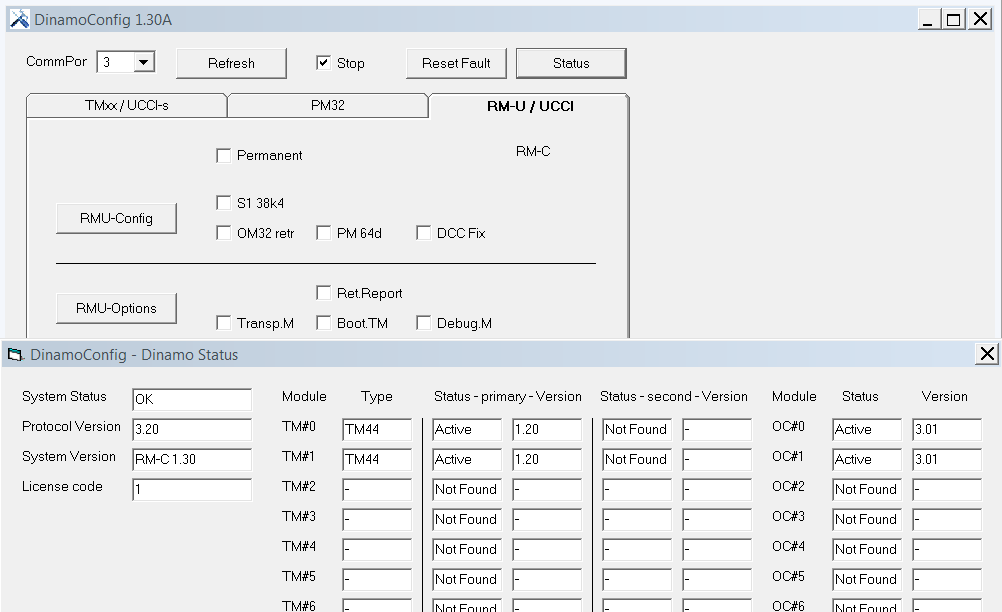
DinamoConfig_Status.PNG
Here the attached file Kleinstadtbahn_omrekenen van blok naar bezetmelder TM44 for my blok-structure.
Ulrich,
Just tested on my own layout (anlage) .
Put TM-44 1 and 2 dip-switches in the positions for 0.0 and 0.1 and did a check of the occupiers.
I made some printscreens in Dinamo config and iTrain so it helps you ; )
Most important for you to check is the Occupier Monitor. If you put in a lok in a block the occupier has to light up.
For me it was for the second TM-44 ( 0.1) Block 2.1 , 2.2 , 2.3 , 2.4 with corresponding occupiers.
Greetings,
Geert

iTrain-RückmeldungsMonitor.png
Dinamoconfig check TM44 1 & 2 (0.0 & 0.1 )
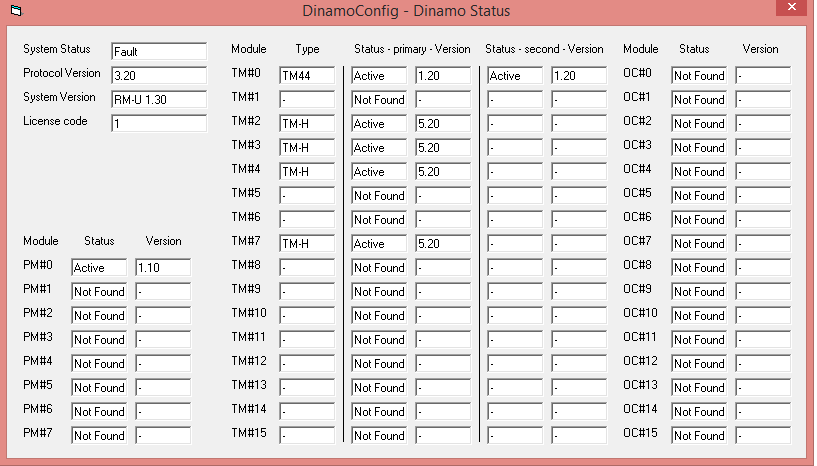
dinamoconfig TM-44--00--01.png
Voreinstellung iTrain
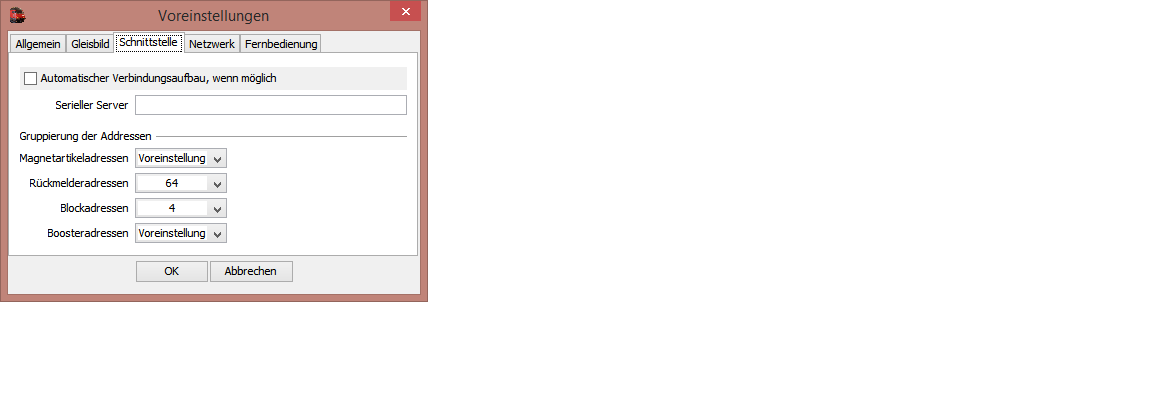
iTrain-Rückmelderadressen.png
Hallo Geert,
sorry that I'haven't answer earlier. But I have made several tests and I will describe the problems in a later posting.
First what goes well, is, that the loks work in all blocks.
The attached screenshot of the occupier monitor shows that all occupier are right connected.
But the occupied messages of the blocks 3, 5a, 6 and 7 of the second TM44-modul doesn't change in blue colour if passes by a lok.
Why not? How can I solve this problem?
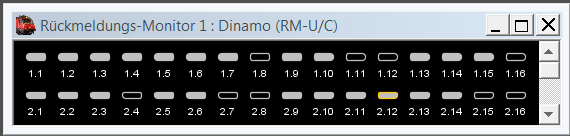
iTrain-RückmeldungsMonitor.png
Hallo Geert,
now the some special problems with märklin z on the attached file from Kleinstadtbahn with Dinamo and iTrain:
1) it's very difficult to get good velocity-messures although all loks are drived in a warming up-phase before messuring
2) the loks doesn't brake or stop in the defined occupier-Position, they stop rughly at the end of the block.
3) the store-track 10 can passes in but no lok can start from there
4) I can only switch one occopier for each relay of the store-tracks and they can't be activated
5) in the reverse-track 7 I can post a lok but I can't reserved this lok to another track, the same problem if I try to reserve a lok from another track to reverse-track 7. Must I invert the track 7 over a relay?
I hope you can help me with your experience as a user of the same analog system with spoor Z
Friendly greetings
Ulrich
Hello Ulrich,
Good to hear that it looks better.
Now what left seems to be a configuration issue in iTrain.
For that I will send you a private mail.
Regards,
Geert
Ulrich,
as requested.
Regards,
Geert
Hallo DINAMO-Users,
ich habe ein Problem, auf meinem Oval mit 3 Blöcken habe ich 10 Volt anliegen, Setz ich aber eine Lok auf sind in dem Block max 0,6 V.
Was mache ich falsch ?
Hi Günter,
And what is the problem?
Best regards, Leon
Hi Leon,
I can not ride a locomotive
Kind regards
Günter
Right,
Analog or digital?
Does your TM44 communicate with the RM-C (orange LED on the TM44 = on)?
Does your RM-C communicate with your PC (orange LED on the RM-C on)?
Does your PC (SW) report an overload/short circuit on the track?
What software do you use for test?
Best regards,
Leon
Die Adresse (jetzt 3.1) des Feedback-Anbieters RM_1-1 ist falsch. Es sollte wahrscheinlich 1.1 sein. Siehe Diagnose (Ctrl+D). RM_3-1 hat auch Adresse 3.1.
@Leon: Spur Z, Analog und iTrain.
Hi Leon,
1. The locomotive is analogue lane Z VT98 (railbus)
2. orange LED on TM44 = on Yes
3. orange LED on the RM-C lights up YES
4. Notebook with WIN 10 64-bit, Java 8, Itrain Standard Version 4.1.10
5. without locomotive on track = 10 V on the rail, locomotive on track = 0.65 V on the rail.
6. The railbus runs perfectly with Märklin speed controller.
7. Die Adresse RM_1.1 wurde korrigiert.
Yours sincerely
Günter
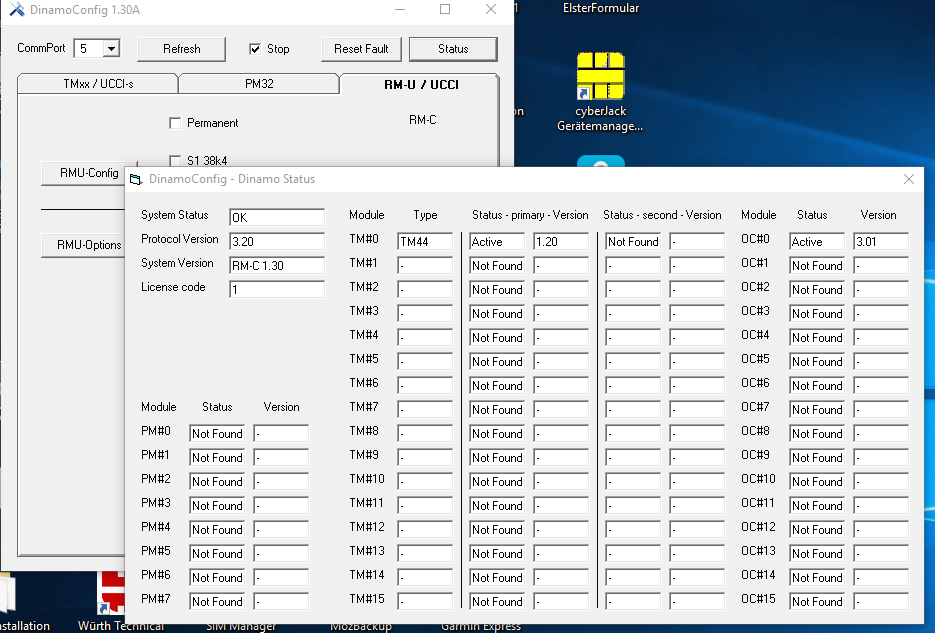
Screenshot 2019-06-17 07.50.27.png
Hi Gunther,
At thirst, it is not possible to measure the voltage output on a dcc or analoque (PWM) track with a normal multimeter. Because of the blockwave caracteristics of the voltage you will see some sort of avarage voltage. You can only see the actual voltage with an ossciloscoop, but it you can determite if there is any voltage or not. So its not totally useless to measure with a multimeter.
The second, your module adres should be 0.0 (as i read your post you have only 1 TM44) In iTrain it will be set automaticly to 1.0 with the blockadresses 1.0 - 1.4 and the occupy adresses 1.1-1.16. But to get the right indication in iTrain you have to set the interface grouping coorectly for the Dinamo inetrnal layout.
In the perfferences you will find the tab Interface in which you can set the grouping correct. Us voor Dinamo:
Accesoires: 32
Blocks: 8
Feedbacks: 128
The you can check in the feedback monitor in iTrain the right feedback adress to use.
In third, we needte determine that you have setup your system correctly (if i read an adres of 3.0, thats not logical)
Switch setting on the TM44, S1 to S8: ON-ON-ON-ON-ON-ON-OFF-OFF
Than your OC32 (i asume he comes as last module in the system as normal for an starting kit) S1 tot S4 all ON. And the jumpers TD en TC are placed.
If the OC32 is before the TM44: TD en TC removed, and on the TM44 S7&S8 ON.
Tonight Leon posted new firmware for the TM44 (1.21) and new Software DinamoConfig (1.32) witch gives you the possibility to check of the master/slave settings are correct and if the Clock is terminated and set-up correctly. You can find the software and firmware on this site at the top in the product support link.
Update the firmware of the TM44 according to the last page of the TM44 manual, its really easy to do. If not please contact me (info@domburgtrainsupport.nl) so i can help you through teamviewer.
Install the new DinamoConfig software and open it when the system is online en al orange leds are constantly burning. When you open the software select the COM port, click on reset fault, and then on status.
You should now see your active TM44 in the primary section of TMx0 and your OC32 active in the above collumn on the right.
Make a screenshot of this so you can post it here for further support.
After you do that, exit that screen and open the left Tab for the TMxx modules/UCCI module. Select in the left dropdown menu the option ALL TMxx and you will see a button showing up in the right lower part that says Master check. Click that button and the software will perform an Master/Slave check. If you did it correctly it will tell you that 0.0 is master. After that he will ask to do a clockbus check. Perform that check to see if your clockbus settings are correct.
To be sure, make print screens of both check and post them with the status check here.
There is also a fourth check that could tell us if there's something wrong.
In the tab of the TMxx/UCCI select in the drop down menu module 0.0, on the right side of all options you will find buttons GET .......) press all the GET buttons on the right and the flashed settings will appear in a green background. Make a print screen of this and also post that here.
Now you have checked if your system is correctly setup, i don't now if you had any form of Plug&Play setup service when you bought the system. Normally we perform a pre-delivery setup if requested so the user is sure his system is set-up correctly and installed on the laptop in the right way and all above steps are not necessary.
If not than these steps are good for you and us to see if there is any fault in your hardware and software setup.
When your system is correct, you can simply test a block with DinamoUserCC, but since you allready have iTrain it is easier to test it there. FInd the correct feedback adresses in the monitor and don't forget to fill in a block number in the blocksettings. When you filled in the feedback- and blockadress, press Fill automaticly and you should be able to drive a loco in that block. Note that the loco must be set in its settings to Analoque or DCC (28) to function.
Good luck, and let us now if you find any faults or problems.
Greetings Martin Domburg
Domburg Train Support
p.s.: Sorry for my stonecoal english, my german is worse
In addition: The reason (i think) Leon only did implament a clockcheck is becuase if the Data is not correct the system wont see the modules, it more clear to determine. If the clock is not working correctly you can get all sort of unexplainable errors.
That was a lot of text...
I suggest you check that your system is set up correctly using DinamoConfig. Press "status" and you should see at least an active TM44 on primary address 0.
Next get and start DinamUsersCC. Open the com-port. Make sure you select Analoog, set speed of blok 1 to 50 or so and press "Geef opdracht". Try blok 2..4 as well.
If that works you know the problem is in your iTrain configuratie.
Hi Martin,
after I finished everything, but did not make the update of the Tm44 error free as an attachment screensuht.zip.
I brought the locomotive to work with DINAMOUserCC.
But the clock setting with TM44 is not Ok.
What do I do now ?
Itiner does not work with Itrain either.
First of all many thanks for the help
and best regards
Günter
Is correct that you can't see clock info because your TM44 is running 1.20. You will have to update the firmware to 1.21
Greetings
Günter,
Your clock settings are ok. Clock quality is not an issue since you have one TM44 only.
Tour loco moves with DinamousersCC. So your system technically works. The reason you cannot control the train from iTrain is likely in your iTrain configuration.
Best regards, Leon
With the help of the iTrain forum everything is ok now.
The trains go.
That was certainly the beginning stupidity !!
Thanks again to all for the help.
Yours sincerely
Günter